
Describe This Outfit
Describe this outfit from a photo, piece by piece: colors, fabrics, fit and overall style. 20 free generations a day, no sign-up.
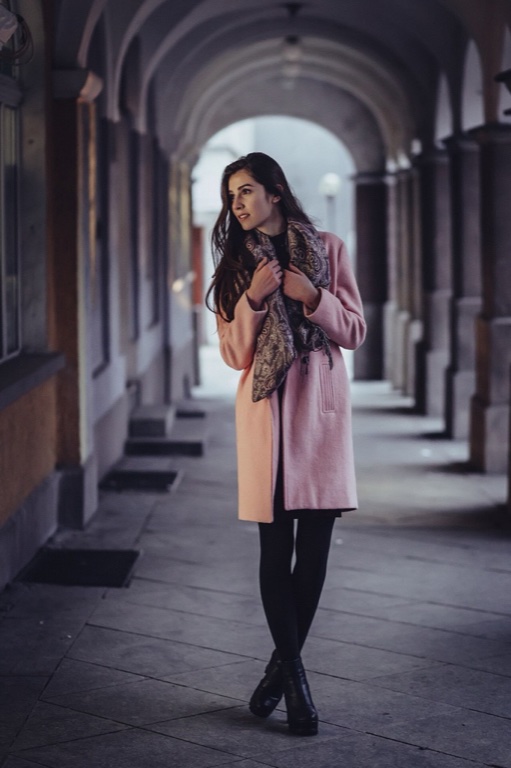
Outfit Description
Example- Scarf: muted taupe, olive and dark brown patterned fabric, loosely draped around the neck with long ends down the front. - Coat: dusty pink wool-like fabric with a contrasting pale peach panel, knee-length straight cut, long sleeves and open front; pockets are visible. - Tights: black, opaque, close-fitting fabric. - Boots: black leather or leather-like material, ankle-height with a slight heel and lace-up front. Style: Soft, understated citywear with a polished, feminine feel. Color palette: Dusty pink, peach, muted earth tones and black. Good for: Everyday wear, city outings, or casual work settings.
How to describe the outfit in a photo
One photo, three ways in, and text you can copy.
- 1
Add the photo
Upload a JPG, PNG, WebP or HEIC file, paste a copied image with Ctrl+V or Cmd+V, or enter an image link. One photo per run, so crop a group shot to the person you want described.
- 2
Pick a style and a language
Choose Item by item, Paragraph or For a story. The Output language menu offers ten languages, English by default. The style decides the shape of the text, not how much of the outfit is read.
- 3
Describe and copy
Press Describe Outfit. The text appears in an editable box next to your photo, so fix a word if you like, then press Copy. Regenerate writes a new version with the same options. Nothing is saved when you leave the page.
What a described outfit includes
Item by item lists every visible piece from top to bottom with its color, likely fabric and cut. On our example photo, a long pink coat worn with a patterned scarf, black tights and ankle boots, it listed the scarf, coat, tights and boots, then added Style, Color palette and Good for lines.
Fabric is judged from how the cloth looks, so you get wording like wool-like or leather-like instead of a care label. Layers, shoes and accessories count as pieces too, when they are in frame. Check the details against your photo, because this is AI output.
Describe her outfit, not her
Use it to describe her outfit or his: the text covers clothes, shoes and accessories only. It makes no comments on the wearer's body, weight, attractiveness or age, and it doesn't guess who the person is. In our tests, a photo of a public figure came back without a name.
If a piece is cropped, hidden or blurry, the description says so briefly. Items that aren't in the photo shouldn't appear.
That keeps the text safe to paste into a listing note, a story or a wardrobe log, since it holds clothing detail and nothing about the person.
Describe this dress for a story
For a story writes third-person prose focused on the clothes: colors, textures, how the fabric moves and what the look says about the wearer's style. It adds no invented name and no plot, so it drops into a scene you are writing, a roleplay character note or a design brief.
Pick Paragraph instead when you want a stylist's summary of the same look, ending with the overall style.
Describe this outfit: three styles compared
| Style | What you get | Length | Good for |
|---|---|---|---|
| Item by item | One bullet per piece, top to bottom, then Style, Color palette and Good for lines | One line per piece | Checking every piece, wardrobe notes |
| Paragraph | One stylist-style paragraph ending with the overall style | About 80 to 120 words | A bio, a post draft, an email |
| For a story | Third-person prose about the clothes | A short passage | Fiction and roleplay |
Every style can be written in English, Spanish, Portuguese, French, German, Italian, Japanese, Korean, Chinese (Simplified) or Russian.
More tools from Img to Prompt
- Describe This CharacterDescribe this character from an anime, game or OC picture: a sheet, a written description or an art prompt. 20 free generations a day, no sign-up.
- Image DescriberUse this image describer to turn any picture into a clear written description, short or detailed. 20 free generations a day, no sign-up.
- Image to PromptImage to prompt in one step: upload a picture and get text for Midjourney, Stable Diffusion, Flux, Nano Banana or GPT Image. 20 free generations a day, no sign-up.
- Instagram Caption GeneratorUpload the photo you're posting and get 5 Instagram captions with hashtags, written for that photo. 20 free generations a day, no sign-up.