
Describe This Character
Describe this character from an anime, game or OC picture: a sheet, a written description or an art prompt. 20 free generations a day, no sign-up.
Character Description
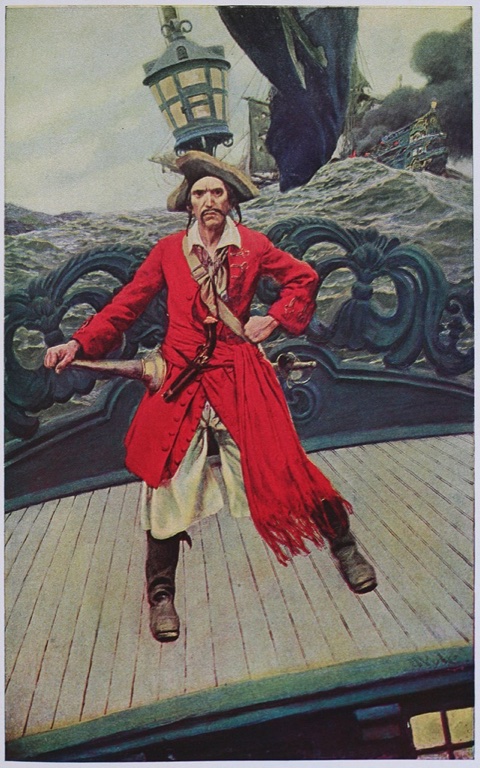
ExampleAppearance: An adult man with dark hair, a narrow mustache, a pointed beard, and a stern, lined face. A broad hat shades his eyes. Outfit: A vivid red, long-tailed coat over a pale shirt and loose light-colored trousers, with a scarf at his neck, a strap across his chest, dark boots, and a curved sword at his side. Pose & expression: He stands wide-legged on a ship’s deck, one hand on his hip and the other resting on the sword, staring ahead with a hard, commanding expression. Art style: Painted adventure illustration with textured brushwork, dramatic detail, and a palette of bright scarlet against muted sea greens and grays. Personality (inferred): Defiant, theatrical, self-assured, and formidable. Vibe: A swashbuckling captain holding his ground amid rough seas.
How we describe this character in a sheet
Pick the Character sheet output and the result is a set of labeled lines: Appearance, Outfit, Pose & expression, Art style, Personality (inferred) and Vibe. Each line is short enough to paste into a wiki, a notebook or a prompt.
On the pirate captain painting in the example, the sheet notes a pointed beard, a scarlet long-tailed coat, a hand resting on a curved sword and bright red against muted sea greens. The Vibe line sums it up as a swashbuckling captain holding his ground.
The tool describes what is drawn. It does not name the character, the franchise or the artist.
Use it to describe this character for a wiki page, a game design note, a commission brief or a fan fiction profile. Because every line starts with a fixed label, you can drop single lines into other documents without editing.
Sheet, prose or art prompt
Character sheet gives the labeled lines for reference notes. Written description turns the same look into one or two paragraphs of third-person prose, the way a writer would introduce a character in a story or a roleplay scene.
Art prompt writes a comma-separated text-to-image prompt that covers hair, eyes, outfit, colors, pose, style and lighting. With that output a Generate this character button appears: it copies the prompt and opens our sister site in a new tab, where you paste it.
Personality is a reading of the look, such as defiant or playful, and the sheet labels it as inferred. It is a starting point for your own character notes.
The output language applies to the labels too, so a Spanish sheet reads Spanish from the first word.
How to describe this character from a picture
One picture per run, three ways to bring it in.
- 1
Add the character image
Upload a JPG, PNG, WebP or HEIC file, paste from your clipboard, or enter an image URL. Anime, game art, illustration, OC art and cosplay photos all work as input. If the picture is a photo of someone in costume, the sheet covers the costume and the look.
- 2
Pick the output and language
Choose Character sheet, Written description or Art prompt, then an output language from the dropdown. Click Describe Character. Each run describes one image; switching the output means running it again.
- 3
Edit, copy or hand off
The text lands in an editable box next to your image. Fix a detail by hand, press Copy, or press Regenerate for a fresh version with the same options.
Pictures that give a better character sheet
The sheet can only describe what it can see.
- Use one character per image, or crop a group shot down to the character you want to describe.
- Pick a picture where the face and hair are clear and not hidden by effects or heavy shadow.
- A full-body or three-quarter view gives the Outfit and Pose lines more to work with than a tight face crop.
- Choose a clean reference sheet or key art over a screenshot crowded with interface elements.
- Keep any name or caption you want quoted legible in the image; only written names are quoted.
- Read the Personality line as a suggestion from the look, and rewrite it if you know the character better.
More tools from Img to Prompt
- Describe This OutfitDescribe this outfit from a photo, piece by piece: colors, fabrics, fit and overall style. 20 free generations a day, no sign-up.
- Image to PromptImage to prompt in one step: upload a picture and get text for Midjourney, Stable Diffusion, Flux, Nano Banana or GPT Image. 20 free generations a day, no sign-up.
- Image DescriberUse this image describer to turn any picture into a clear written description, short or detailed. 20 free generations a day, no sign-up.
- AI Image AnalyzerThis AI image analyzer reads your image for objects, text, colors, composition and mood. 20 free generations a day, no sign-up.